 ANT
A new or reset switch may have a fixed management IP address while your Mac uses a different network. Connecting an Ethernet cable alone is then not enough. Your Mac needs an address in the same subnet and a connection through the correct adapter. ANT provides a device catalogue, a temporary IP address, a connectivity test and a way to open the device's web management interface.
Find the device's address
Check the default IP address and subnet mask in the documentation for the exact model or in its current configuration. Some switches obtain an address through DHCP; there is no universal default IP address. If management uses a particular VLAN, the switch port and the Mac's connection must also match that configuration.
For example, a switch at 192.168.1.254 with a subnet mask of 255.255.255.0 (/24) could be reached from a Mac using the available address 192.168.1.250/24. These are example values only. Choose an address appropriate for your device and check that no other device uses it. Do not assign the switch's own address to your Mac.
Connect the correct adapter
Connect your Mac's Ethernet adapter to a suitable switch port. Select that adapter in ANT and check its link status. If Wi-Fi or a VPN is also active, check routing too: overlapping subnets can send traffic to the device through a different interface.
Use the catalogue and a temporary IP
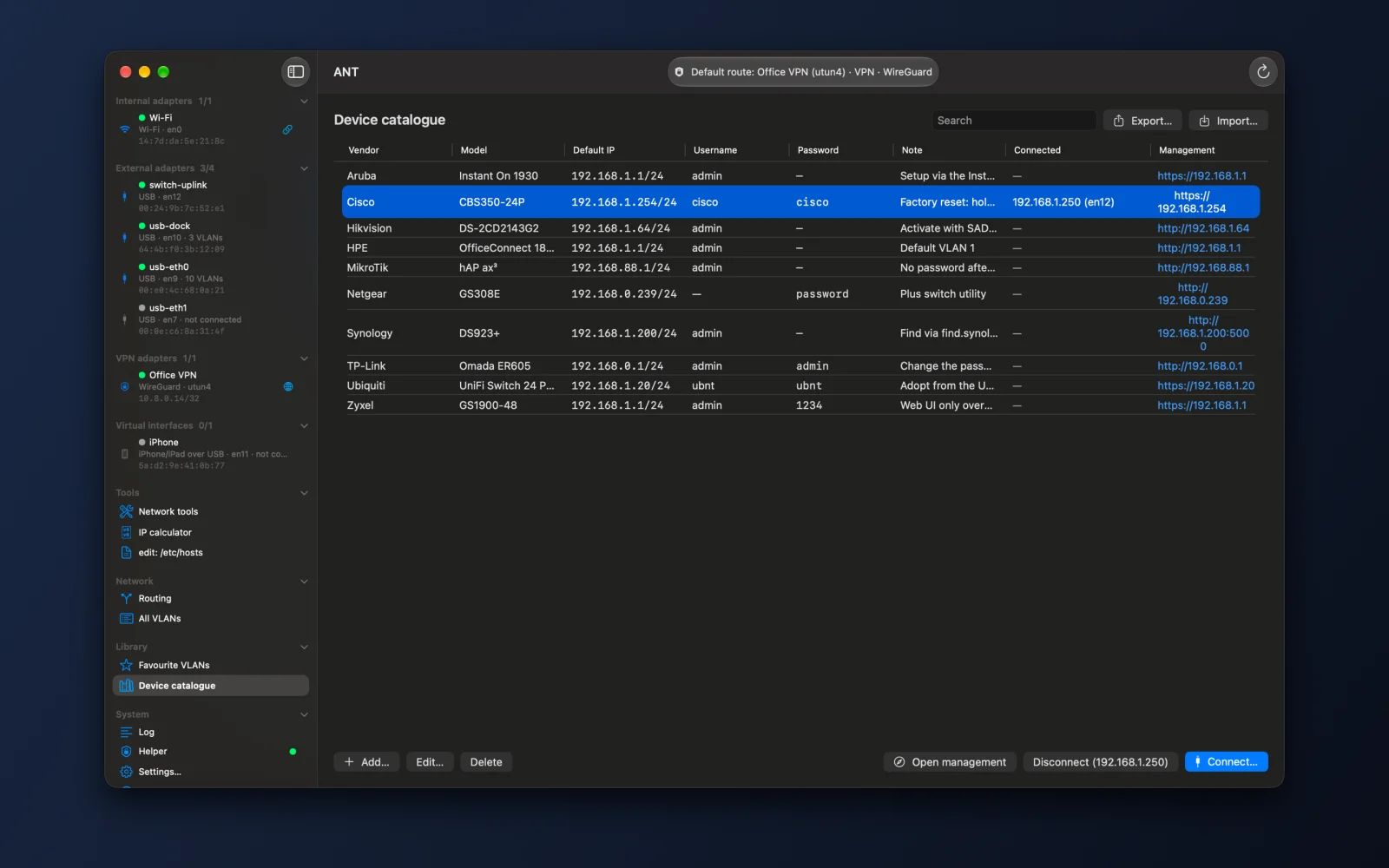
Open Device catalogue, select the device and choose Connect… ANT automatically suggests an IP address for your Mac on the same network (different from the device's) — for example, 192.168.1.250 for a device at 192.168.1.254. You can change the suggested address before connecting. You can save your own Mac address for a device in the catalogue; ANT will then offer it automatically.
ANT lists network adapters with their link status. Select the correct adapter and optionally enable the connectivity test and opening web management in your browser. Review the details, then click Connect.
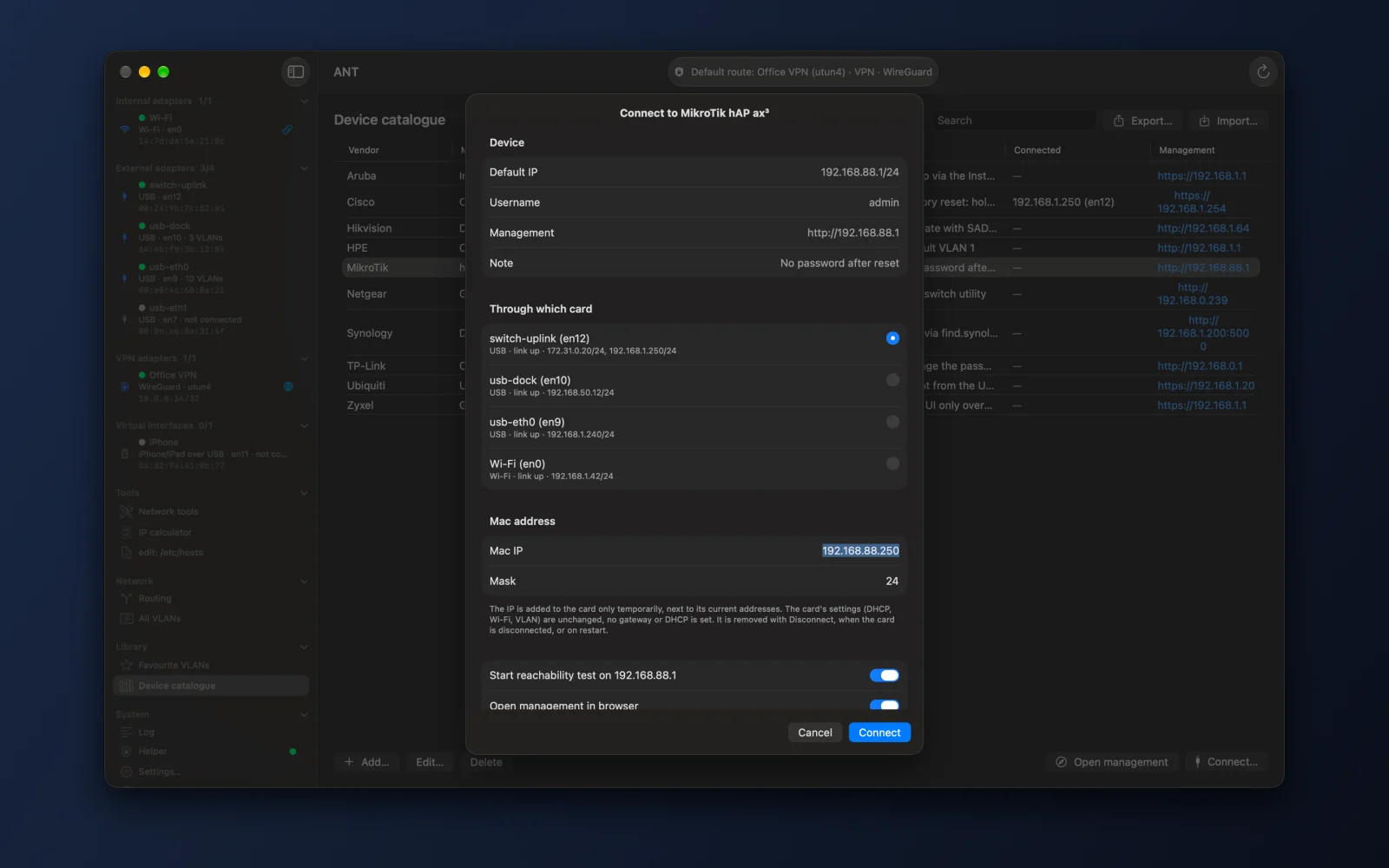
The IP address is added temporarily alongside the existing addresses. The adapter configuration, DHCP, Wi-Fi and VLAN settings remain unchanged; this connection does not configure a gateway or DHCP. ANT's privileged helper applies the change at your request.
A temporary IP is useful when moving between devices with different default addresses. Always check the destination network and adapter first. Changing your Mac's IP address quickly should still include checking the configuration.
Test connectivity and open management
If you enabled these options, ANT runs the connectivity test and opens the device's web management interface after connecting. Use credentials valid for that device: the catalogue's details may not match a password that has already been changed. A failed ping alone does not prove that web management is unavailable; the device may block ICMP.
If management does not open, check the cable, port status, IP address, subnet mask, management VLAN and route to the device. Direct communication within the same subnet does not require a default gateway. Do not set the switch as your gateway simply to access its management page.
Disconnect the temporary IP
Remove the temporary IP using Disconnect in the device catalogue. It is also removed automatically when you disconnect the adapter or restart your Mac. The adapter's existing configuration is preserved.
Tip: protection against automatic DHCP
When you connect a new USB Ethernet adapter, macOS automatically enables DHCP on it. ANT's DHCP protection (on by default, settings in the Helper section) immediately turns this automatic change off, so your Mac does not start obtaining an address from the customer's network. This protection is a separate feature; connecting through the catalogue does not change DHCP settings.
Try ANT
ANT requires macOS 27 or later and Apple Silicon (arm64). Intel Macs are not supported. The application interface is available in English and Czech only. The website is available in eight languages. The trial starts when you click Start 3-day trial in the app.
Download ANT for macOSApple Silicon (arm64)