 ANT
Adapters and VLANs
An untagged connection and multiple VLANs on a single adapter. Configure IP addresses, DNS, static routes and MTU for each network.
802.1Q · DHCP · static IPAdvanced Network Toolkit for macOS
ANT is a native macOS application for network administrators who configure VLANs, IP addresses and routes, diagnose connections and connect to network devices.
Your favourite VLAN configurations, personal device catalogue and saved scanning scenarios are always ready for immediate reuse.
Free and unrestricted for the first 3 days. The trial starts when you click Start 3-day trial in the app, not when you install it. After that, a license is required; you can ask the author to extend your trial.
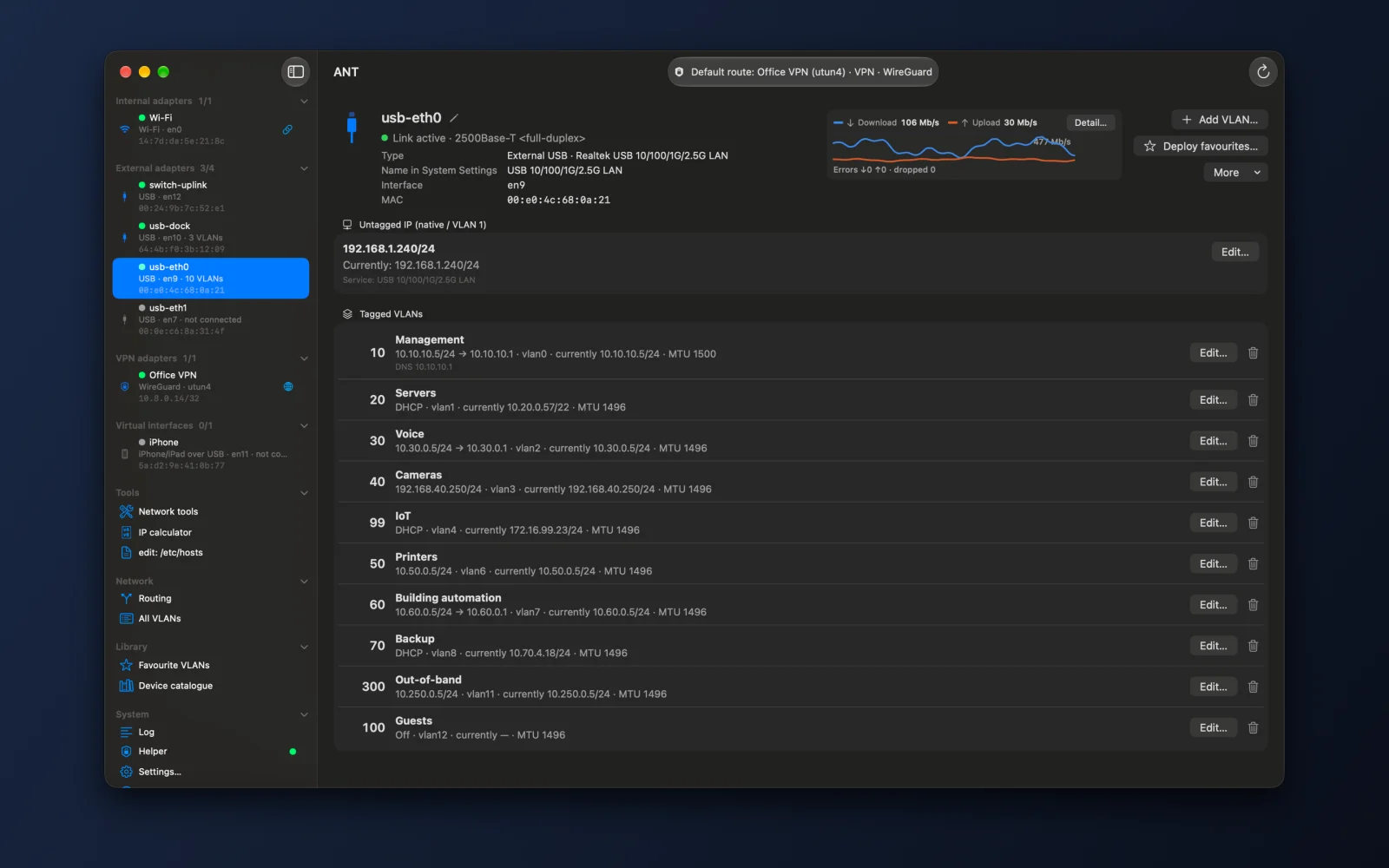
Your adapter, untagged connection and VLANs in one view.
From configuration to results
Configure connections, work with VLANs and diagnose your network in one clear interface.
An untagged connection and multiple VLANs on a single adapter. Configure IP addresses, DNS, static routes and MTU for each network.
802.1Q · DHCP · static IPDiscover devices, inspect open ports and services, or trace a connection. Browse structured scan results and export them to CSV.
Network scan · ping · DNS · tracerouteSave frequently used VLANs, device profiles and scanning scenarios. Deploy multiple VLANs at once, or pick up an adapter’s saved configuration when you reconnect it.
Templates · device catalogue · historyGallery
The actual app interface. Choose an area and open the screenshot for a closer look.
Adapter settings, an untagged connection and individual VLANs.
MTU
An unsuitable MTU may be the cause. At your request, ANT automatically tests packets of different sizes over a VLAN and finds the highest working MTU for the connection to your chosen destination.
Validation of addresses, masks and VLAN IDs, with warnings about overlapping subnets.
Using a service connection as the default route is switched off by default.
See what changed, when it happened and the result.
Ethernet, Wi-Fi, VLANs, VPN and system virtual interfaces in one overview. Monitor their addresses, status and routing to see how your Mac is currently connected.
The overview also includes interfaces such as Thunderbolt Bridge and iPhone or iPad connections over USB.
Check device reachability with ping, trace the path of packets with traceroute and inspect name resolution with DNS queries. Whois helps you look up domain and IP address information.
The TCP/TLS console lets you communicate manually with services and inspect their responses. Connection diagnostics are together in one place — and much more.
Calculate address ranges, subnet masks and available hosts, split a network into subnets or check whether an address belongs to a network. The IP calculator supports IPv4 and IPv6.
The routing table shows which interface and gateway a connection uses. The hosts editor lets you change local name-to-IP mappings, with backups for restoring the previous state.
Explore nearby Wi-Fi networks, signal strength, noise and signal-to-noise ratio. Compare the 2.4, 5 and 6 GHz bands, channels and channel widths, Wi-Fi generations and security. Connection details also include link speed, BSSID, and hardware and private MAC addresses.
Interface traffic graphs show download and upload speeds, errors and dropped packets. IP and DNS settings are within reach.
Choose a saved profile with the device’s default IP address. ANT pre-fills an address for your Mac on the same network. Select an interface, click Connect and start configuring the device.
The IP address is added temporarily alongside the interface’s existing addresses, without overwriting its current settings. ANT can also open the device’s web management interface and run a reachability test.
The catalogue is your own list of device profiles.
Pricing & licensing
ANT for 2 Macs. A one-time purchase covers the entire 1.x series, including future updates and enhancements. Moving to the next major version is your choice.
The full app for 3 days. The trial starts when you click Start 3-day trial in the app.
one-time purchase · Prices include VAT
Free and unrestricted for the first 3 days. The trial starts when you click Start 3-day trial in the app, not when you install it. After that, a license is required; you can ask the author to extend your trial.
ANT is a native macOS app distributed as a DMG. It is signed and notarized by Apple. The first launch guides you through the required permissions.
Network configuration changes require system privileges. A helper service handles a defined set of network operations. The app explains which permissions it needs and why.
Nmap, ncat and nping are included in the app. You do not need to install Homebrew for these tools.
The application interface is available in English and Czech only. The website is available in eight languages.
A one-time purchase covers ANT on 2 Macs and all updates in the 1.x series. There is no subscription. The 2-Mac limit is shared across major versions.
Free and unrestricted for the first 3 days. The trial starts when you click Start 3-day trial in the app, not when you install it. After that, a license is required; you can ask the author to extend your trial. One trial is available per Mac and major version.
Moving to a new major series is an optional paid upgrade. The upgrade price from 1.x to 2.x is USD 29 / EUR 29 / CZK 700. If you do not upgrade, you can keep using the 1.x series you purchased. Purchases made within 90 days before a new major release receive that upgrade free.
An activated license allows up to 30 days without another verification. A reminder appears from day 23. After 30 days, reactivation is required, either online or using an offline activation code obtained on another device.
Yes. Deactivate the previous device, then activate the new one. Self-service deactivation is available up to three times in 30 days. Contact the author for exceptions.
Contact
Creator of ANT
Have a question or want to explore my other work? Get in touch.
ANT IN PRACTICE
Find tools for the task at hand — from VLAN configuration to connecting to a switch.
Configure tagged and untagged networks on one Ethernet adapter. Set IP, DHCP, DNS, routes and MTU, then reuse saved VLAN configurations.
Discover devices, open ports and services with ANT's built-in nmap. Resolve device names, scan over VPN and export results to CSV.
Inspect nearby Wi-Fi networks, signal strength, channels and 2.4, 5 and 6 GHz bands. View connection details and network recommendations.
Diagnose connections with ping, traceroute, DNS, Whois and a TCP/TLS console. Check MTU, static routes and your Mac's default route.
Calculate IPv4 and IPv6 networks, address ranges and subnet sizes. Split and merge networks with ANT’s native Mac IP calculator.
Use device profiles and a temporary IP address to reach a switch or network device. Test connectivity and open its web management interface.
The application interface is available in English and Czech.